
A Complete Sample API Documentation Guide
July 26, 2025

Excellent sample API documentation isn't just a technical manual. It's the first real handshake between your service and a developer, acting as a complete toolkit that gets them up and running with as little friction as possible. When it’s done right, great documentation gives developers clear instructions, solid examples, and a layout so intuitive they can figure things out on their own.
What Makes API Documentation Truly Great
Think of your API documentation as the primary user interface for your API. If developers can find what they need in seconds, they're far more likely to integrate your service successfully and, even better, become advocates for your product. This isn't a "nice-to-have" anymore, especially as the API economy continues to explode. The API management market was valued at $5.24 billion in 2025 and is on track to hit an incredible $16.01 billion by 2029, which tells you everything you need to know about how vital the developer experience has become.
To make sure your documentation delivers, it’s helpful to understand the essential parts that come together to create a smooth experience for the developer.
Core Components of Effective API Documentation
The table below breaks down the essential elements every high-quality API documentation should have. Each component serves a distinct purpose, guiding developers from their first look to advanced implementation.
| Component | Purpose | Key Information |
|---|---|---|
| Introduction & Overview | To quickly explain what the API does and why a developer should use it. | High-level purpose, core features, and a "Getting Started" guide. |
| Authentication | To provide secure access to the API. | Step-by-step instructions for getting and using API keys, OAuth tokens, etc. |
| Endpoint Reference | To detail every available function of the API. | HTTP methods (GET, POST, etc.), URI paths, and a description of what each endpoint does. |
| Request & Response Examples | To show developers exactly what to send and what to expect back. | Code snippets in multiple languages (like cURL, Python, JavaScript) and sample JSON responses. |
| Error Handling | To help developers troubleshoot when things go wrong. | A list of status codes (400, 404, 500) with clear explanations and solutions. |
By structuring your documentation around these core components, you create a reliable and user-friendly resource that developers will genuinely appreciate.
The Pillars of Quality Documentation
Ultimately, a truly great set of API docs is built on a few non-negotiable pillars that create that seamless user journey. Each one is designed to answer a developer's questions before they even have to ask.
- A Clear Introduction: Right up front, explain what the API is for and the value it provides. No jargon, just a straight-up explanation.
- An Authentication Guide: Walk them through every single step of getting and using their credentials. This is often the first major hurdle.
- A Detailed Endpoint Reference: Every endpoint needs its own section, complete with all available methods, parameters, and paths. Leave no room for ambiguity.
- Practical Code Examples: Provide code snippets that are ready to be copied and pasted. If you can, offer them in a few popular languages.
- A Guide to Error Handling: List out all your status codes and give clear, actionable advice on what they mean and how to fix the problem.
This visual breakdown shows key metrics from a sample API, highlighting things like endpoint distribution and overall performance.
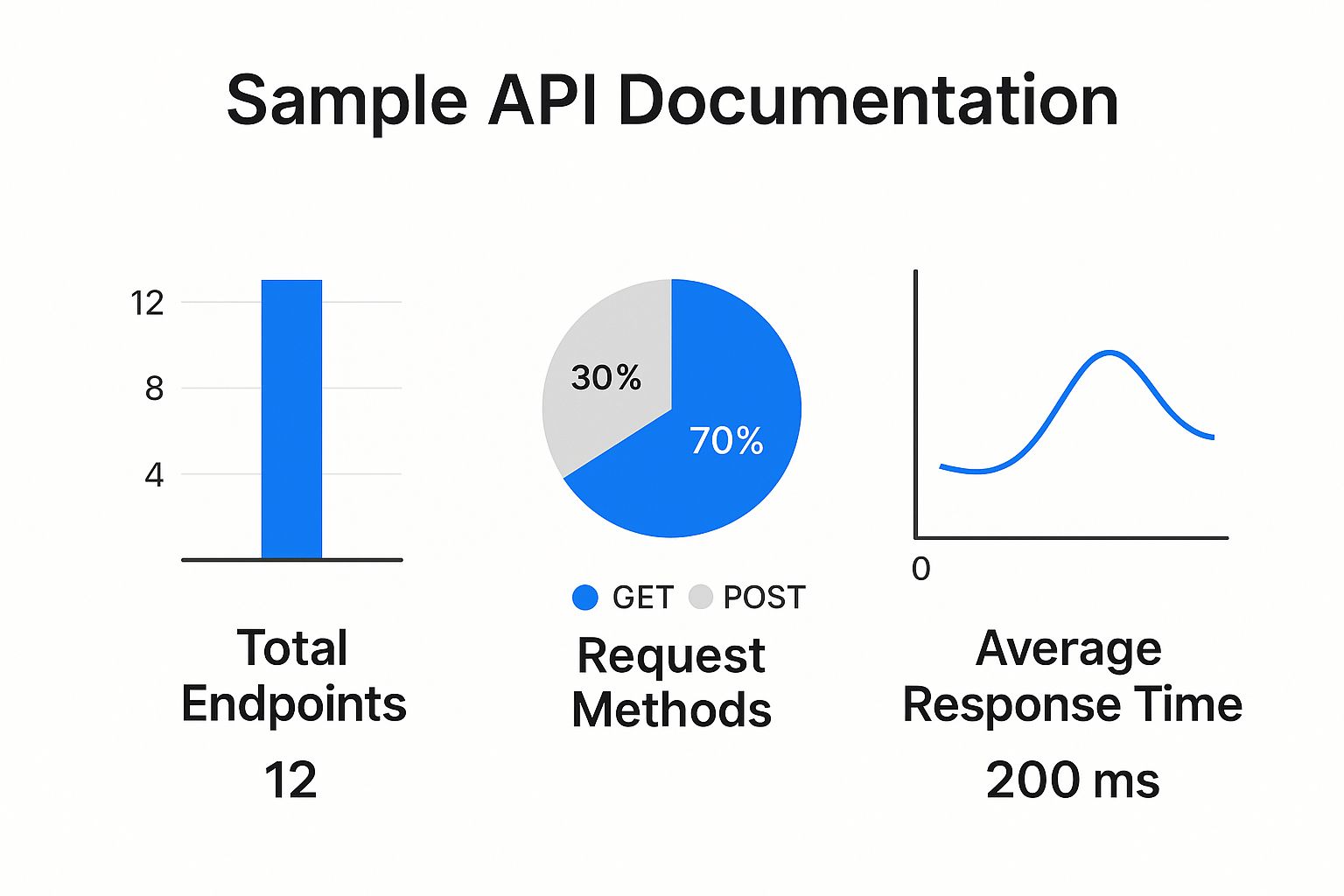
You can see the API is heavily focused on data retrieval (70% GET requests) while maintaining a fast 200ms average response time. Beyond just the technical data, remember that the tone of your documentation matters. It's crucial to ensure it aligns with your developer audience; you can get more insight on this by checking out our guide at /brand-voice-examples/.
If you want to see all these principles in action, take a look at a well-structured example like Whisperchat's Comprehensive API Documentation. It’s a great real-world model.
Building Your Getting Started Guide

When someone first lands on your sample API documentation, the "Getting Started" guide is their runway. Think of it as the most important handshake you'll have with a developer. The entire point is to get them from zero to their first successful API call as fast as possible, removing every ounce of friction along the way. To do that, this section needs to be incredibly clear and all about taking action.
Right out of the gate, state exactly what your API does and give them the base URL. This is ground zero for every request they'll ever make. Right after that, explain your versioning strategy. Let them know immediately how to target a specific version, whether it's part of the URL path (like /api/v2/) or a simple request header.
Outlining Authentication Methods
If there's one place developers get stuck, it's authentication. This is almost always the first major hurdle. A well-written authentication section can single-handedly prevent a mountain of support tickets. You need to break it down with simple, step-by-step instructions for every method you support.
Here are the most common methods you should document:
- API Keys: Show developers how to generate a key from their dashboard and exactly where to put it in a request. This is usually a header (e.g.,
X-API-Key: YOUR_API_KEY) or a query parameter. - OAuth 2.0: For this more complex flow, you need to provide the authorization URL, the token URL, and a clear list of required scopes. Walk them through the process of getting that all-important access token.
- Bearer Tokens: Explain how to pass the token in the
Authorizationheader. This is a very common approach for modern APIs, so make it obvious.
A truly effective "Getting Started" guide anticipates the very first questions a user will have. By giving them authentication examples they can copy and paste, you're handing them an early win. That small success builds the confidence and momentum they need to dive deeper into your API.
Technical documentation is always changing. For more on this, check out our article on how artificial intelligence is changing content creation, which discusses generating code snippets and instructional content.
Providing Clear Code Snippets
Finally, you have to back up your instructions with real, working code. Nothing builds confidence like a complete example of an authenticated request that just works.
For example, a simple cURL command showing how to send a bearer token is invaluable:
curl --request GET
--url https://api.example.com/v1/users/123
--header 'Authorization: Bearer YOUR_BEARER_TOKEN'
--header 'Accept: application/json'
This kind of snippet gives developers a tested, functional block of code they can immediately use and adapt. It's the fastest way to get them off the ground and running with your API.
How to Structure Your API Endpoint Reference

The endpoint reference is the absolute heart of your sample API documentation. Think of it as the detailed map developers will keep coming back to. Because of this, its structure needs to be logical, predictable, and crystal clear. Getting this right from the start prevents guesswork, slashes implementation errors, and dramatically cuts down on support tickets.
You should treat every endpoint like its own mini-guide. The goal is to give a developer every single piece of information they need to make a successful request, all in one place. This stops them from having to piece together bits of information from all over your documentation just to make a simple call.
Detailing Each Endpoint
I've found the best approach is to start every endpoint description with the same foundational elements. This creates a consistent pattern that developers quickly learn to scan, helping them find what they need in seconds.
For every single endpoint, you have to clearly state:
- The HTTP Method: Is it
GET,POST,PUT,PATCH, orDELETE? This is the most basic, crucial piece of information. - The Full URL Path: Provide the complete path, for example,
/users/{userId}. I always use curly braces to make path parameters stand out. - A Clear Description: A single, concise sentence explaining what the endpoint actually does. Something like, "Retrieves a specific user's profile information by their unique ID."
This block of information gives a developer immediate context before they dive into the more granular details of the request.
A great endpoint reference works just like a quick-lookup dictionary. When a developer needs to know how to fetch a list of products, they should be able to find the
GET /productsendpoint instantly and see its purpose and structure.
Documenting Request Parameters
Right after the basics, you need to break down every possible parameter a developer can send. Any ambiguity here is a guaranteed source of frustration and failed API calls. I can't stress this enough: grouping parameters by their type is a standard best practice for a reason-it makes the information far easier to digest.
The API management market is booming and expected to hit $20.28 billion by 2030. This growth is all about building scalable apps, which depend on flexible, well-documented APIs to work together. Properly documenting your parameters is your contribution to enabling that kind of smooth integration. If you're interested in the market trends, you can read the full research on API management growth.
It's best to organize your parameters into these common categories:
- Path Parameters: These are the variables directly inside the URL path, like our
{userId}example. - Query Parameters: Optional or required key-value pairs tacked onto the end of the URL (e.g.,
?limit=10). - Header Parameters: Information passed along in the request headers, typically for things like authentication or specifying the content type.
- Request Body: The JSON payload you send with
POST,PUT, orPATCHrequests.
For every single parameter, list its name, data type (string, integer, boolean), a short description of what it's for, and whether it's required or optional. This level of detail is what allows a developer to build a valid request on their very first attempt.
Documenting API Responses and Error Codes
Knowing what the API sends back is just as crucial as sending the perfect request. Your sample API documentation needs to spell out every possible response, both the good and the bad. This simple step removes all the guesswork, giving developers what they need to build solid applications that can handle success and failure without skipping a beat.
Think of it this way: a successful response is a pat on the back, confirming the developer's code works. A well-documented error, on the other hand, is a roadmap showing them exactly what to fix. Without that clarity, developers are left in the dark, which leads to buggy code and a lot of frustration.
Structuring Success Responses
For every single endpoint, you have to show what a successful response actually looks like. A 200 OK or 201 Created status is a good start, but it's not enough. Developers need to see the structure of the data they're about to receive.
The best practice is to show the full JSON response body first. This gives them a bird's-eye view. Right after that, break it down field by field in a simple, easy-to-read table.
Example Success Response 200 OK for GET /users/{userId}
{ "id": "usr_1a2b3c4d5e", "username": "testuser", "email": "testuser@example.com", "createdAt": "2024-08-15T10:30:00Z", "isActive": true }
Now, let's explain what each of those fields means.
| Field | Data Type | Description |
|---|---|---|
id |
String | The unique identifier for the user. |
username |
String | The user's chosen username. |
email |
String | The user's registered email address. |
createdAt |
ISO 8601 | The timestamp when the user account was created. |
isActive |
Boolean | Indicates if the user account is currently active. |
This kind of detailed breakdown is gold. It tells developers precisely what data types to expect and why each field exists, making it a breeze to parse the response correctly in their application.
A Guide to Common Error Codes
Documenting your errors ahead of time is probably one of the most helpful things you can do for a developer. It empowers them to solve their own problems and builds serious trust in your API. For this, a straightforward table is usually the most effective tool.
For each error, make sure you provide the HTTP status code, a short explanation of what it means in the context of your API, and a sample error response body. That sample is incredibly important because it shows developers how to catch and handle the error programmatically.
An API with great error documentation turns a potential dead-end into a clear signal. Instead of getting stuck on a
401 Unauthorizederror, a developer sees a structured response telling them their API key is missing or invalid.
Common API Error Codes and Responses
| Status Code | Meaning | Sample Response Body |
|---|---|---|
| 400 Bad Request | The server can't process the request because of a client-side mistake, like a typo in the JSON or an invalid parameter. | { "error": "invalid_parameter", "message": "The 'limit' parameter must be an integer." } |
| 401 Unauthorized | The request doesn't have the right authentication credentials. The client needs to send a valid API key or token. | { "error": "unauthorized", "message": "Authentication required." } |
| 403 Forbidden | The client is authenticated, but they don't have the rights to access the specific resource they're asking for. | { "error": "forbidden", "message": "You do not have permission to access this resource." } |
| 404 Not Found | The resource the client requested simply doesn't exist on the server. | { "error": "not_found", "message": "The requested user ID does not exist." } |
| 500 Internal Server Error | This is a generic "oops" from the server. Something unexpected went wrong on our end that prevented us from handling the request. | { "error": "server_error", "message": "An unexpected error occurred. Please try again later." } |
When you take the time to document both successes and failures this way, your API documentation becomes a truly complete and reliable resource that developers will thank you for.
Including Practical Code Examples

Let's be honest. Theory is important, but nothing gets a developer up and running faster than a chunk of code they can copy, paste, and execute right away. This is the moment your sample API documentation transitions from a reference book to a practical, hands-on toolkit. Giving developers functional, multi-language code examples is one of the most powerful things you can do to get them to that first successful API call.
The idea is to offer complete, ready-to-run snippets that accomplish a real task, like pulling a list of users or creating a new product. This approach not only builds immediate confidence but also gives developers a working foundation they can tweak for their own needs. It saves them from the tedious and error-prone process of writing boilerplate code from scratch.
Providing Multi-Language Snippets
Your developer audience isn't a monolith; they work across a huge spectrum of languages and frameworks. By providing examples in a few of the most popular ones, you instantly make your API more welcoming and accessible to a wider pool of talent. It’s a small investment that pays huge dividends.
At a minimum, I always recommend covering these bases:
- cURL: This is the universal language of APIs. It's a command-line tool that's perfect for quick, language-agnostic tests. Every developer should be able to run a cURL command.
- JavaScript: Essential for any web developer. You should include modern examples using the
Fetch APIor a popular library likeAxios. - Python: The
Requestslibrary is the de facto standard for API interactions in the Python world, making it a non-negotiable example.
Think of it this way: when you offer code in their preferred language, you're meeting the developer where they are. It shows you've thought about their workflow, which turns your documentation from a static document into an indispensable development aid.
Building a Complete Code Example
A truly useful code sample is more than just a single line of a request-it's a self-contained, complete recipe for success. A great snippet includes everything a developer needs to make the call work on their first try, eliminating any guesswork.
Here’s what a solid cURL example for fetching a user list looks like:
curl --request GET
--url https://api.example.com/v1/users?limit=10
--header 'Authorization: Bearer YOUR_API_TOKEN'
--header 'Accept: application/json'
This snippet works because it has everything: the HTTP method, the full endpoint URL with a query parameter, and the required headers for authorization and content negotiation. It’s a complete package.
This principle of creating self-sufficient, valuable content is powerful. In fact, it’s a core concept when you discover how to repurpose content for different channels. By giving developers complete examples, you're setting them up for a win right from the start.
Documenting Advanced API Topics
To truly empower developers, your sample API documentation has to go beyond the basics. While documenting endpoints is a great start, the real-world success of an integration hinges on operational details. Things like rate limiting and versioning aren't just minor points; they're critical for building stable, scalable applications that won't break under pressure.
Think about rate limiting. It's not just a restriction; it's a safety mechanism that protects your API's performance and availability for everyone. Good documentation doesn't just state the limits; it explains how a developer knows they're approaching them, typically through response headers.
An API that's documented with real-world scenarios in mind is a lifesaver. When you clearly explain how to handle a
429 Too Many Requestserror and suggest practical backoff strategies, you turn a frustrating dead-end into a predictable, manageable part of the development process.
This level of detail is becoming more important every day. As more businesses build their services on a foundation of interconnected APIs, the need for reliability is paramount. The global API management market is expected to balloon to $32.48 billion by 2032, a clear signal of how essential these data exchanges have become. You can read more about the API management market's rapid growth on coherentmarketinsights.com.
Explaining API Versioning Strategies
Versioning is your promise to developers that you can evolve your API without wrecking their existing work. Your documentation needs to spell out your versioning strategy with absolute clarity so developers can build future-proof code. Alongside versioning, robust security is a must, which is why a solid understanding of API Key best practices is also essential.
Here are a couple of the most common versioning approaches you'll want to document:
- URI Path Versioning: This is the most straightforward method. You simply include the version number directly in the endpoint URL, like
https://api.example.com/v2/products. It’s impossible to miss and makes it obvious which version a developer is using. - Header-Based Versioning: A slightly more subtle approach involves using a custom request header, such as
Accept-Version: v2. This keeps your URIs clean and consistent across versions, but it does mean developers need to remember to include that header in every request.
Covering these advanced topics prepares developers for what it’s really like to use your API in production. In the same way that clear technical documentation is crucial, so is compelling content in other domains. If that’s something you’re interested in, check out our guide on using AI tools for better product descriptions.
Best Practices for Maintaining Documentation
Let’s be honest: outdated documentation is often worse than no documentation at all. It misleads developers, breaks their integrations, and ultimately erodes trust in your API. The best teams I've worked with avoid this pitfall by treating their API docs as a core part of the product, not just a task to check off at the end.
This mindset is often called the "docs-as-code" philosophy. The concept is straightforward-documentation updates should be a non-negotiable part of your development workflow. When a developer modifies an endpoint, the update to the docs must be included in that very same pull request. This is how you ensure your sample api documentation is always a perfect mirror of the live API.
Automate and Iterate
Automation is your best friend here. By using tools that support the OpenAPI Specification (formerly Swagger), you can generate your core endpoint references directly from your source code. This is a game-changer because it eliminates the tedious, error-prone manual work and guarantees your reference docs stay accurate.
Beyond the tooling, you need a solid process. Here’s what works:
- Version Control: Keep your documentation right alongside your API code in the same repository. It’s all part of the same product.
- Mandatory Updates: Make "update the docs" a required step in your pull request template or definition of done for any API change. No exceptions.
- Community Feedback: Pay close attention to your developer community. They are your first line of defense and will quickly spot confusing language, errors, or gaps in your documentation.
When you treat your documentation as a living, breathing asset, you send a powerful message to developers. It shows you respect their time and are genuinely invested in their success.
This cycle of continuous improvement is fundamental to modern software development. In the same way, the content world is constantly advancing; you can explore what's new in our guide to AI content creation tools.
Ready to streamline your business operations with powerful AI? Stravo AI offers an all-in-one suite to help you create content, analyze data, and build apps faster than ever. Start your free trial today!
Write smarter, starting today
Join entrepreneurs and teams who draft, rewrite and ship their content with one AI suite.